

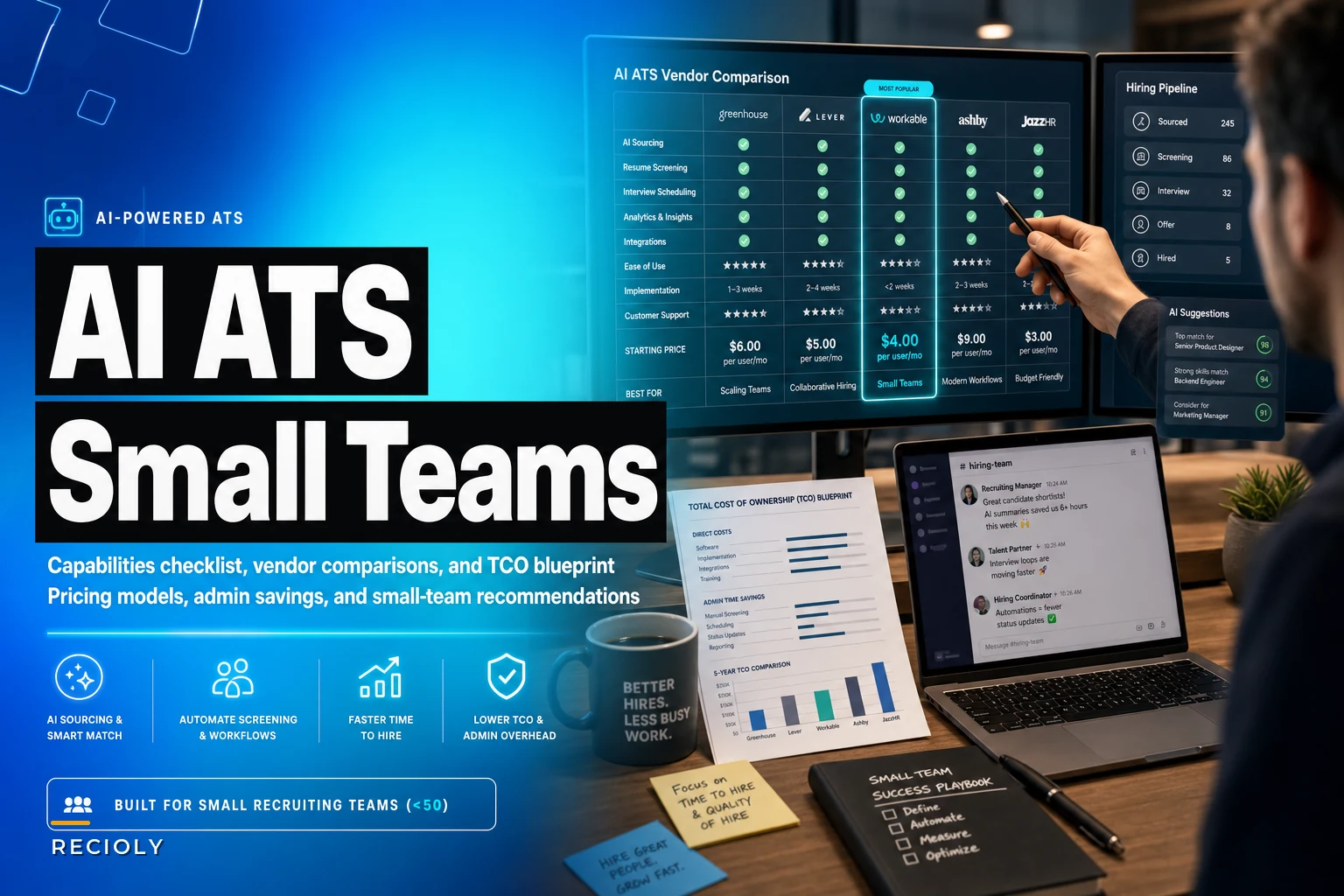

The ATS market is built for enterprises, and that's the trap small teams keep falling into. You sign up for a platform priced and designed around a 40-person recruiting org, then spend half your week doing manual work the enterprise features were supposed to eliminate — because those features only pay off at a scale you don't have.
This guide skips the "what is an ATS" throat-clearing. If you run recruiting for a company under 50 employees — or you are the recruiting function — the real question is narrower: which AI-enabled ATS actually removes admin work and shortens time-to-hire without burying you in per-seat fees, AI credit surprises, or a six-week implementation you'll never finish.
The capability checklist that actually matters for small teams
Most vendor comparison charts list 60 features. Small teams need maybe a dozen of them. Here's the filter worth using, grouped by the four things that actually move time-to-hire.
Sourcing
-
Built-in job board distribution (free boards + one-click paid)
-
Chrome extension or LinkedIn capture for passive sourcing
-
AI-assisted candidate matching against open reqs (and whether it's useful or just a ranking gimmick)
-
Resume parsing accuracy — this is the silent killer, more on it below
Scheduling
-
Calendar sync (Google/Outlook) with two-way availability
-
Self-scheduling links candidates can book themselves
-
Panel/multi-interviewer coordination without the email tennis
ATS workflow & automation
-
Stage-based automation (auto-move, auto-email on stage change)
-
Templated rejection and nudge emails with merge fields
-
Approval workflows for job openings and offers
-
Bulk actions that actually work on mobile
Analytics & reporting
-
Time-to-hire and time-in-stage out of the box
-
Source attribution that survives candidates touching multiple channels
-
Export access (CSV/API) so you're not locked into their dashboards
That last analytics point matters more than people expect. If your reporting lives entirely inside the vendor's UI and you can't pull clean records out, you've got no path to building a proper measurement layer later. We walk through how to build that layer cheaply in Recruiting without BI: build a minimal recruitment analytics foundation in 90 days — worth reading alongside this, because the schema and attribution choices there directly affect which ATS export format will save you pain later.
The six vendors, scored against the checklist
These are the ones that keep showing up on real small-team shortlists: BreezyHR, Workable, Recruitee, Manatal, JazzHR, and Ashby. Each is strong somewhere and weak somewhere, and the differences are sharper than the marketing pages admit.
Never lose track of top talent again.
Recioly helps you manage every stage of recruiting efficiently, from application to offer.
- Centralized candidate tracking
- Automated interview scheduling
- Collaborative hiring workflows
No credit card required
| Vendor | Sourcing | Scheduling | Workflow/Automation | Analytics | Best fit for |
|---|---|---|---|---|---|
| BreezyHR | Good (strong board distribution, visual pipeline) | Solid self-scheduling | Very good drag-drop automations | Basic | Teams wanting the easiest setup |
| Workable | Excellent (AI sourcing + big board network) | Good | Good | Good | Teams hiring across many roles at once |
| Recruitee | Good (collaborative sourcing) | Good | Good, very team-friendly | Decent | Hiring-manager-heavy collaboration |
| Manatal | Good (AI matching, cheap) | Basic | Decent | Decent | Agencies + budget-first teams |
| JazzHR | Decent | Basic (add-ons) | Good for the price | Basic | Pure budget SMB, US-focused |
| Ashby | Strong | Excellent | Excellent (deepest automation) | Excellent (built-in analytics) | Data-driven teams scaling fast |
Now the parts the table can't hold.
BreezyHR
Pros: Genuinely the fastest to stand up. The visual pipeline makes sense to non-recruiters, which matters when a founder or office manager is co-running hiring. Automations — auto-advance, scorecard requests, nudges — are easy to configure without a specialist.
Cons: Reporting is thin. If you want cohort analysis or real source ROI, you'll outgrow it.
Small-team verdict: Strong pick for a 1–3 person function that values "I set it up in a weekend" over analytical depth.
Workable
Pros: The sourcing and job-board reach is the widest here, and the AI candidate recommendations are among the more useful ones — they surface passive candidates rather than just re-ranking applicants. Good automation and a mature mobile app.
Cons: Pricing climbs fast as you add jobs and features. AI sourcing credits are metered.
Small-team verdict: Best when you're running 8–15 open roles simultaneously and sourcing is the bottleneck, not admin.
Recruitee
Pros: Built for collaboration. Hiring managers actually log in and use it, which is rare. Clean automation for stage movement and task assignment.
Cons: Advanced analytics and some automation sit behind higher tiers. Sourcing tools are fine but not a standout.
Small-team verdict: Great if your bottleneck is hiring managers ghosting the process — the UX pulls them in.
Manatal
Pros: The cheapest serious option with AI matching built in. Surprisingly capable for the price, and the AI scoring against job descriptions is decent for a first-pass sort.
Cons: Scheduling and reporting are the weakest of the group. Support and ecosystem are lighter.
Small-team verdict: Budget-constrained teams and small agencies who can live with manual scheduling.
JazzHR
Pros: Simple, affordable, proven for US SMBs. Solid core workflow and approvals for the money.
Cons: Scheduling and texting are paid add-ons, so the sticker price understates real cost. Analytics are basic.
Small-team verdict: Fine for straightforward, lower-volume hiring where you don't need sourcing firepower.
Ashby
Pros: The most complete workflow and analytics engine on this list by a wide margin. Scheduling handles complex panels without breaking a sweat, and native analytics mean you may not need a separate BI layer for a while.
Cons: Priced and pitched upmarket. Overkill — and over-budget — for a 2-person team doing 10 hires a year.
Small-team verdict: The pick if you're small now but scaling hard and want to avoid a painful migration in 18 months.
How these are actually priced (and where the bill surprises you)
Vendor pricing pages are designed to show you one number. The real cost is assembled from four or five levers.
Per-seat vs. per-job. This is the first fork. Per-seat (common with Ashby, Recruitee tiers) rewards you for having few recruiters and many roles. Per-job or job-slot pricing (common in parts of BreezyHR/Workable plans) punishes you when you post a lot but have fewer users. If you're a one-recruiter shop running 12 reqs, per-seat wins. If you're a three-person team running 4 reqs, per-job may be cheaper.
Tiered feature gating. The feature you specifically bought the tool for — approvals, automation rules, analytics, SSO — is very often one tier above where the demo happened. Confirm your must-have capability is in the plan you're pricing, not the one above it.
AI credits / usage charges. This is the newest and least understood cost driver. AI sourcing, AI matching, and AI-written outreach are increasingly metered as credits on top of your base plan. A team doing heavy outbound sourcing can burn through the included allotment in the first two weeks of the month and either hit a throttle or pay overages.
SMS and email credits. Texting candidates is one of the biggest time-to-hire improvements available — and it's almost always a metered add-on. Transactional email is usually free; SMS rarely is. A high-volume month of candidate texting can quietly add a few hundred dollars to your bill.
The pattern that repeats: teams compare base prices, pick the cheapest option, then land 20–30% over budget once credits, add-ons, and that one critical gated feature are factored in.
Vendor-specific caveats to check *before* you sign
These are the constraints buried in docs and fair-use policies that bite small teams after onboarding. Confirm each against the vendor's current terms — they change — but know to ask:
-
AI credit caps. Several vendors include a monthly AI/sourcing credit allotment that resets and does not roll over. Heavy outbound months get throttled. Ask: what's the included allotment, the overage rate, and does unused credit carry over?
-
API rate limits and access tier. API access is frequently locked to higher plans, and even when available it's rate-limited. If your analytics plan depends on nightly exports, confirm the limit supports your record volume.
-
Parser accuracy. This is the one nobody tests in the demo. Every ATS parses resumes imperfectly — mangled names, dropped employment dates, split skills. On a 10-page CV or a design-heavy PDF, error rates spike. Run 15–20 of your real resumes through the trial parser and count the errors before committing.
-
Job-posting caps. Job-slot and tiered plans cap concurrent open postings. Hit the cap mid-sprint and you're either upgrading or taking a req offline. Map your realistic peak concurrent-req count, not your average.
-
Board distribution limits. "Posts to 1,000+ boards" often means free boards; premium slots (Indeed Sponsored, LinkedIn) are separate spend.
During a trial, run two live reqs with your actual board mix and source at least ten passives to surface parser errors and credit burn quickly.
A quick way to pressure-test any of these during a trial: open two real reqs, post to your actual board mix, source ten passive candidates using the AI tools, schedule three interviews with self-scheduling links, and export the resulting records to CSV. One afternoon will surface the parser errors, the credit burn rate, and the export quality — the three things the sales call won't show you.
Attribution tagging: the small habit that prevents big reporting problems
There's a problem specific to AI-enabled tools that almost nobody plans for: when the vendor's AI sources a candidate, your source data gets muddy. Did that hire come from LinkedIn, or from the AI that found them on LinkedIn? If you don't separate those, your source ROI numbers quietly lie to you, and you can't tell whether the AI feature you're paying for is actually producing hires.
A minimal tagging pattern fixes this without a data project. Enforce three fields on every candidate from day one:
-
Source — the top-level channel (Inbound, Referral, Sourced, Agency, Board)
-
Source_Detail — the specific origin (LinkedIn, Indeed, employee name, specific board)
-
SourcedByAI — a simple boolean
did the vendor's AI surface this person?
That boolean is the whole trick. It lets you later answer "what's our cost-per-hire on AI-sourced candidates vs. human-sourced?" — which is exactly the number that justifies or kills the AI add-on at renewal. The schema and attribution logic behind making these fields survive candidates touching multiple channels is covered in detail in the Recruiting without BI foundation guide. Set these three fields up before you have a thousand candidates in the system, because retrofitting attribution is miserable.
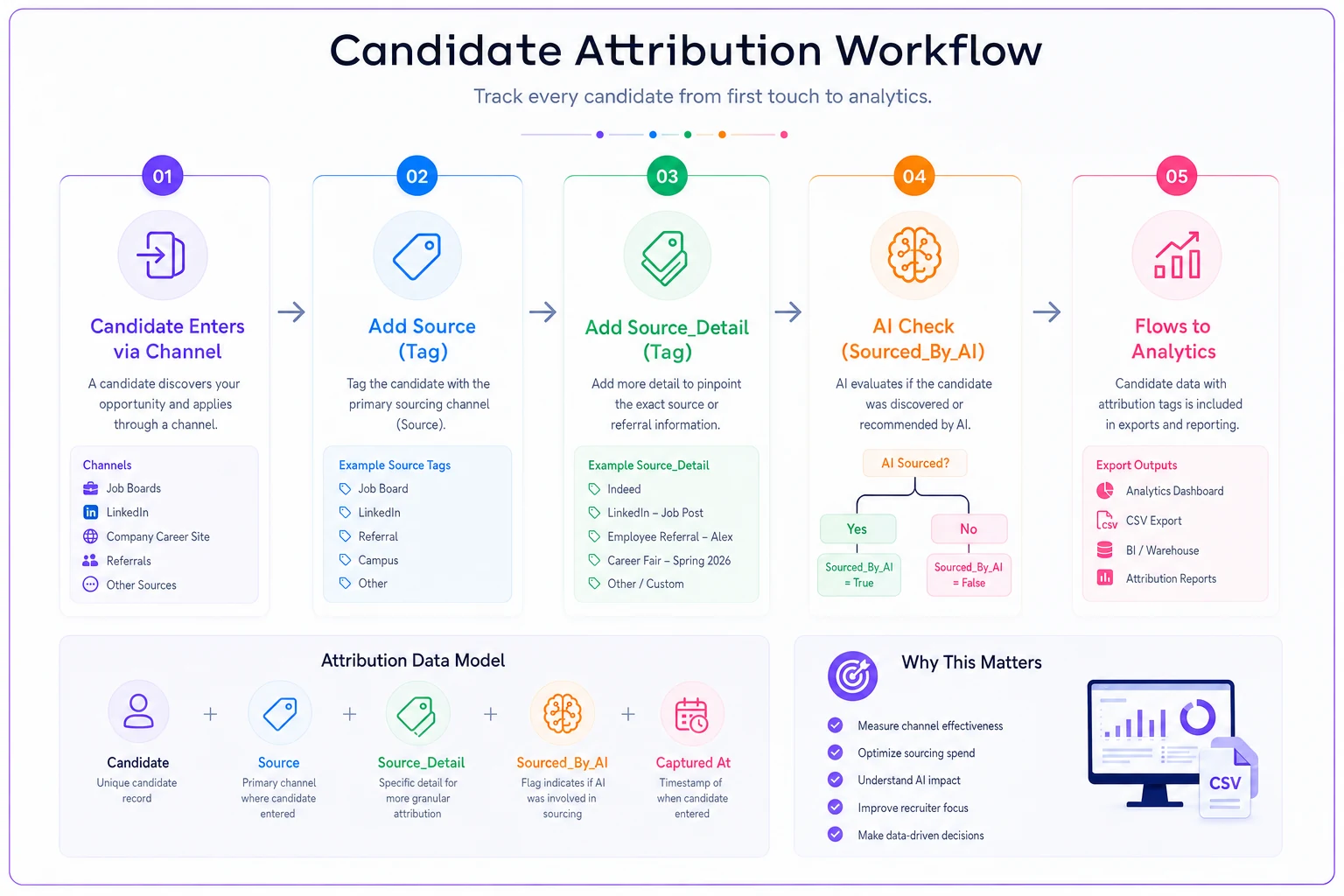
A quick visual of the tagging flow helps stakeholders understand how attribution survives candidate handoffs and AI-sourced finds.
Set these fields up before you have a thousand candidates in the system, because retrofitting attribution is miserable.
All-in-one vs. best-of-breed: the decision for low-admin teams
Small teams are constantly sold on best-of-breed stacks — separate sourcing tool, separate scheduler, separate ATS, stitched together with integrations. For teams under 50, that's usually the wrong call.
Choose all-in-one (single ATS with native sourcing + scheduling) when:
-
You have no one dedicated to maintaining integrations
-
Your hiring volume is steady, not spiky
-
Reducing admin and context-switching is the top priority
-
You'd rather accept a "good enough" sourcing tool than manage two logins and a sync that breaks
Choose best-of-breed only when:
-
One function (usually sourcing) is so central that a specialized tool measurably outperforms, and
-
You have the hours to own the integration when it drifts
The hidden cost of best-of-breed for small teams is integration maintenance — every disconnected sync becomes a manual re-entry task, which is the exact admin work you were trying to eliminate. For most teams under 50, a strong all-in-one beats a clever stack.
Who should NOT over-invest: a founder-led team doing fewer than roughly 15 hires a year does not need Ashby-level analytics or a separate sourcing platform. BreezyHR or JazzHR plus disciplined tagging will outperform an over-engineered stack nobody maintains.
A small-sheet TCO calculator you can build in ten minutes
Stop comparing monthly sticker prices. Build this in a spreadsheet and compare annual all-in cost per vendor, then tie it to payback.
Line items (annual):
-
Base subscription (seats × per-seat price, or job slots × price) × 12
-
Required tier upgrade (if your must-have feature is gated)
-
AI credits
estimated monthly sourcing volume × overage rate × 12
-
SMS credits
estimated candidate texts/month × rate × 12
-
Premium job board spend (sponsored posts you'll realistically run)
-
Implementation / migration (one-time, amortize over 12 months)
-
Integration cost (if best-of-breed — license + estimated maintenance hours × loaded hourly rate)
Sum those for True Annual Cost.
Simple payback formula:
> Payback (months) = Implementation + Migration cost ÷ Estimated monthly savings Where monthly savings = (hours of admin removed per month × loaded recruiter hourly cost) + (faster time-to-hire value, if you can estimate cost of a vacant role per day × days saved).
A realistic small-team example: a tool that removes roughly 20 hours of scheduling and data-entry admin per month at a loaded rate of around $45/hour recovers about $900/month in capacity. If implementation and migration ran $2,500, payback lands near three months — before you even count the time-to-hire improvement. If a vendor can't clear payback inside two quarters on admin savings alone, the AI features have to be doing serious lifting to justify it.
A quick real-world scenario
A ~35-person SaaS company — one full-time recruiter plus a hiring-manager pool — was running six open roles on a cheap ATS with no scheduling and manual source tagging. Time-to-hire sat around 42 days, and the recruiter estimated six to eight hours a week lost to scheduling back-and-forth and copy-pasting candidate data between tools.
They moved to an all-in-one with native self-scheduling and automated stage emails, and enforced the three-field tagging pattern from day one. The scheduling links alone took interview coordination from a multi-day email thread to same-day booking. Within about two months, time-to-hire dropped into the low 30s, and the recovered admin hours went back into actual sourcing.
The unexpected win was the SourcedByAI field. At renewal they could see the AI sourcing add-on had produced only one hire in a quarter, so they dropped it and reallocated the budget to sponsored board posts that were clearly converting. Clean attribution didn't just save time — it let them cut spend that wasn't working, which is a harder thing to do without data.
Bringing it together
For teams under 50, the winning ATS isn't the one with the longest feature list. It's the one whose automation and scheduling remove the most clicks while keeping your data clean enough to trust. Match the pricing model to your shape (few recruiters + many reqs = per-seat; few reqs + more users = per-job), pressure-test the parser and AI credit burn during the trial, and set up Source / SourceDetail / SourcedBy_AI tagging before your candidate count gets out of hand.
If you're early and budget-led, BreezyHR or JazzHR with disciplined tagging will do the job. If sourcing is the bottleneck, Workable or Manatal depending on budget. If collaboration with hiring managers is the sticking point, Recruitee. And if you're small now but scaling fast and want to skip a painful migration later, Ashby is worth the premium.
Pair whichever you pick with the lightweight analytics approach in the Recruiting without BI guide, and you'll have a stack that's lean to run and honest about what's actually working.
For teams under 50, the winning ATS isn't the one with the longest feature list. It's the one whose automation and scheduling remove the most clicks while keeping your data clean enough to trust. Match the pricing model to your shape (few recruiters + many reqs = per-seat; few reqs + more users = per-job), pressure-test the parser and AI credit burn during the trial, and set up Source / SourceDetail / SourcedBy_AI tagging before your candidate count gets out of hand.
Ready to elevate your hiring process?
Join 1,500+ recruiting teams using Recioly to save time, improve collaboration, and hire smarter.