

Most recruiting teams discover they're overloaded the same way — candidates sit untouched for days, hiring managers start complaining, and everyone scrambles trying to figure out who's drowning and who actually has bandwidth. By then, the damage is already done. Key candidates have accepted other offers, urgent roles stay unfilled, and the whole hiring machine slows to a crawl.
The frustrating part is that recruiting leaders usually feel this coming. They see the warning signs — response times getting longer, recruiters working weekends, quality starting to slip. But without actual capacity data, they're stuck making gut calls about workload distribution and hiring priorities.
What makes recruiter capacity forecasting particularly tricky is how uneven recruiting work actually is. Unlike customer service where you can predict ticket volume, recruiting workload comes in waves. A sudden req approval dumps 15 new positions on the team. Three recruiters schedule vacation the same week. A priority role needs everyone focused on it. Traditional workforce planning wasn't built for any of this.
The hidden math of recruiting capacity that nobody tracks properly
Here's what actually determines recruiting capacity, based on patterns I've seen across dozens of recruiting teams:
-
6–8 active requisitions for senior technical roles
-
10–12 active requisitions for mid-level positions
-
15–20 active requisitions for entry-level or high-volume roles
But those numbers assume perfect conditions that never exist. Real capacity depends on role complexity, candidate volume, interview coordination requirements, and a bunch of other variables teams rarely measure consistently.
Most teams track req load — how many open positions each recruiter owns. That's like measuring a developer's workload by counting their assigned tickets without knowing whether they're bug fixes or full architecture redesigns. A recruiter with 5 engineering manager searches might be more stretched than someone juggling 15 entry-level sales roles.
Things get messier when you factor in everything recruiters do beyond req ownership:
-
Sourcing and outreach (varies wildly depending on how hard the role is)
-
Initial screens (30–45 minutes each, plus notes)
-
Interview coordination (endless back-and-forth)
-
Candidate nurturing (keeping warm leads from going cold)
-
Hiring manager meetings (weekly syncs add up fast)
-
Offer negotiations (can eat up days on senior roles)
-
Pipeline reporting (the overhead nobody accounts for)
One recruiting ops manager I worked with discovered her team was spending roughly 40% of their time just on interview scheduling. They had a solid ATS but were still manually coordinating complex interview loops across multiple timezones. That invisible workload meant their actual capacity was barely half what leadership assumed.
Role families change everything about capacity planning
The biggest mistake in recruiter capacity planning is treating all reqs the same. A senior backend engineer search requires completely different effort than filling customer service roles, yet most teams assign them identical capacity weight.
Never lose track of top talent again.
Recioly helps you manage every stage of recruiting efficiently, from application to offer.
- Centralized candidate tracking
- Automated interview scheduling
- Collaborative hiring workflows
No credit card required
Smarter recruiting teams segment their capacity model by role family:
Technical roles (engineering, data, product):
-
Heavy sourcing requirement (15–20 hours per hire)
-
Complex screening (technical assessments)
-
Lengthy interview process (4–6 stages)
-
Competitive offer negotiations
-
Capacity
6–8 concurrent reqs max
Sales and business development:
-
Moderate sourcing (10–12 hours per hire)
-
Personality and culture fit focus
-
Faster interview cycles (2–3 stages)
-
Commission structure complexity
-
Capacity
10–12 concurrent reqs
Operations and support:
-
Light sourcing (5–8 hours per hire)
-
Higher application volume
-
Standardized screening
-
Quicker decisions
-
Capacity
15–20 concurrent reqs
Executive and leadership:
-
Extensive sourcing and research
-
Confidential searches
-
Multiple stakeholder management
-
Extended timeline (3–6 months)
-
Capacity
2–3 concurrent searches
These aren't just different req types — they're fundamentally different workstreams requiring different skills, tools, and time investments. A recruiter who excels at high-volume operational hiring might struggle badly with executive search. Your capacity model needs to account for those specializations, not flatten them.
Shift planning templates that match real recruiting workflows
The standard 9-to-5 doesn't really work for modern recruiting. Candidates respond to outreach in the evenings. Hiring managers want updates before their morning meetings. International candidates need calls at odd hours. Coverage matters more than everyone working the same schedule.
A few shift structures that actually hold up in practice:
Core hours model (most common):
-
Everyone overlaps 10am–3pm for meetings and coordination
-
Staggered starts create extended coverage
-
Early shift
7am–3pm (catches East Coast and Europe)
-
Standard shift
9am–5pm
-
Late shift
11am–7pm (covers West Coast and after-work candidates)
Specialized coverage model:
-
Sourcing team works flexible hours for maximum reach
-
Screening team holds standard hours
-
Coordination team provides extended coverage
-
Executive recruiters work fully flexible schedules
A weekly rotation that prevents burnout:
-
Monday/Tuesday
Full team standard hours (heavy meeting days)
-
Wednesday
Staggered shifts for extended coverage
-
Thursday
Flex day (adjusted hours, WFH)
-
Friday
Early close option for strong performers
One team I looked at implemented "power blocks" — protected 3-hour windows where recruiters could focus entirely on sourcing or screening without meetings or Slack interruptions. They staggered these blocks across different times so someone was always reachable for urgent needs while others had protected deep work time. Simple idea, but it made a real difference.
Stagger power blocks so someone is always reachable during others' deep work.
Shift planning also has to account for your triage workflow and priority routing rules. If you're promising 24-hour response times for priority candidates, someone actually needs to cover that window.
Buffer calculations that prevent pipeline crashes
Every recruiting team needs buffer capacity for the surprises that always show up. The question is how much, and where to build it in.
The basic formula:
Total capacity needed = Base workload + Surge buffer (20–30%) + Absence buffer (15%)
But raw percentages miss the nuance. Buffer requirements shift based on several factors:
Seasonality patterns:
-
Q1
Post-holiday hiring surge (need ~30% buffer)
-
Q2
Steady state (20% is usually fine)
-
Q3
Summer slowdown (15% buffer)
-
Q4
Budget rush and holiday complexity (25% buffer)
Role-specific buffers:
Technical roles need larger buffers because a single req can suddenly explode in complexity — a "simple" developer hire turns into a nightmare when the hiring manager changes requirements mid-search. Sales roles need less buffer since the process tends to be more predictable.
Geographic buffers:
Remote-first companies need higher buffers to account for timezone coordination complexity. Teams hiring locally can run leaner.
Here's what buffer planning roughly looks like in practice:
| Team Size | Base Capacity (reqs) | Surge Buffer | Absence Buffer | Total Safe Capacity |
|---|---|---|---|---|
| 5 recruiters | 50–60 reqs | +15 reqs | +8 reqs | 35–40 active reqs |
| 10 recruiters | 100–120 reqs | +30 reqs | +15 reqs | 70–80 active reqs |
| 20 recruiters | 200–240 reqs | +60 reqs | +30 reqs | 150–170 active reqs |
The numbers look conservative. That's intentional. Running at 70% capacity feels slow right up until you hit a hiring surge — then you have room to absorb it without everything breaking at once.
Early warning signals that actually predict overload
Most teams realize they're overloaded when candidates start complaining or reqs age past 60 days. By that point, you're already in crisis mode. The goal is spotting capacity problems 2–3 weeks before they hit hiring outcomes.
Weekly signals worth tracking:
Response time degradation:
-
Initial outreach taking more than 48 hours
-
Screening notes submitted more than 24 hours after calls
-
Hiring manager questions sitting unanswered past one business day
Quality indicators slipping:
-
Declined offer rate climbing above 30%
-
Candidate experience scores dropping
-
Hiring manager satisfaction declining
-
Sourcing quantity falling while hours worked increases
Process shortcuts appearing:
-
Skipping reference checks to save time
-
Batch-rejecting candidates without proper review
-
Recycling old job descriptions instead of customizing
-
Pushing candidates through without proper vetting
Team behavior changes:
-
Recruiters consistently working overtime
-
Internal meetings getting skipped
-
Documentation quality dropping
-
Team chat going quiet because everyone's buried
The most reliable early warning signal in my experience? Track the ratio of weekly screening calls to active reqs. When this drops below 2:1, pipelines start dying. A healthy pipeline needs at least 2 new candidates entering screening each week per open req. When recruiters get overloaded, sourcing is the first thing to stop — and that pipeline gap won't show up in your metrics for another 3–4 weeks.
Building the weekly dashboard without fancy BI tools
You don't need Tableau or PowerBI to track recruiter capacity effectively. A simple spreadsheet updated weekly gives you everything needed for real capacity decisions.
The basic weekly tracker pulls data from your ATS plus a short team survey:
Per recruiter metrics (updated Monday morning):
-
Active req count by role family
-
Candidates in active pipeline stages
-
Screens scheduled this week
-
Offers extended or pending
-
Hours worked last week
-
Planned PTO in the next two weeks
Team rollup metrics:
-
Total weighted capacity (using role family multipliers)
-
Current utilization percentage
-
Buffer availability
-
Pipeline velocity by stage
-
Bottleneck identification
The 5-minute weekly check-in:
-
Current req load (auto-pulled from ATS)
-
Capacity feeling (green/yellow/red)
-
Top priority this week
-
Biggest current bottleneck
-
Any coverage needs
That qualitative data paired with quantitative metrics creates a complete picture. The subjective "capacity feeling" often predicts problems before the numbers catch up.
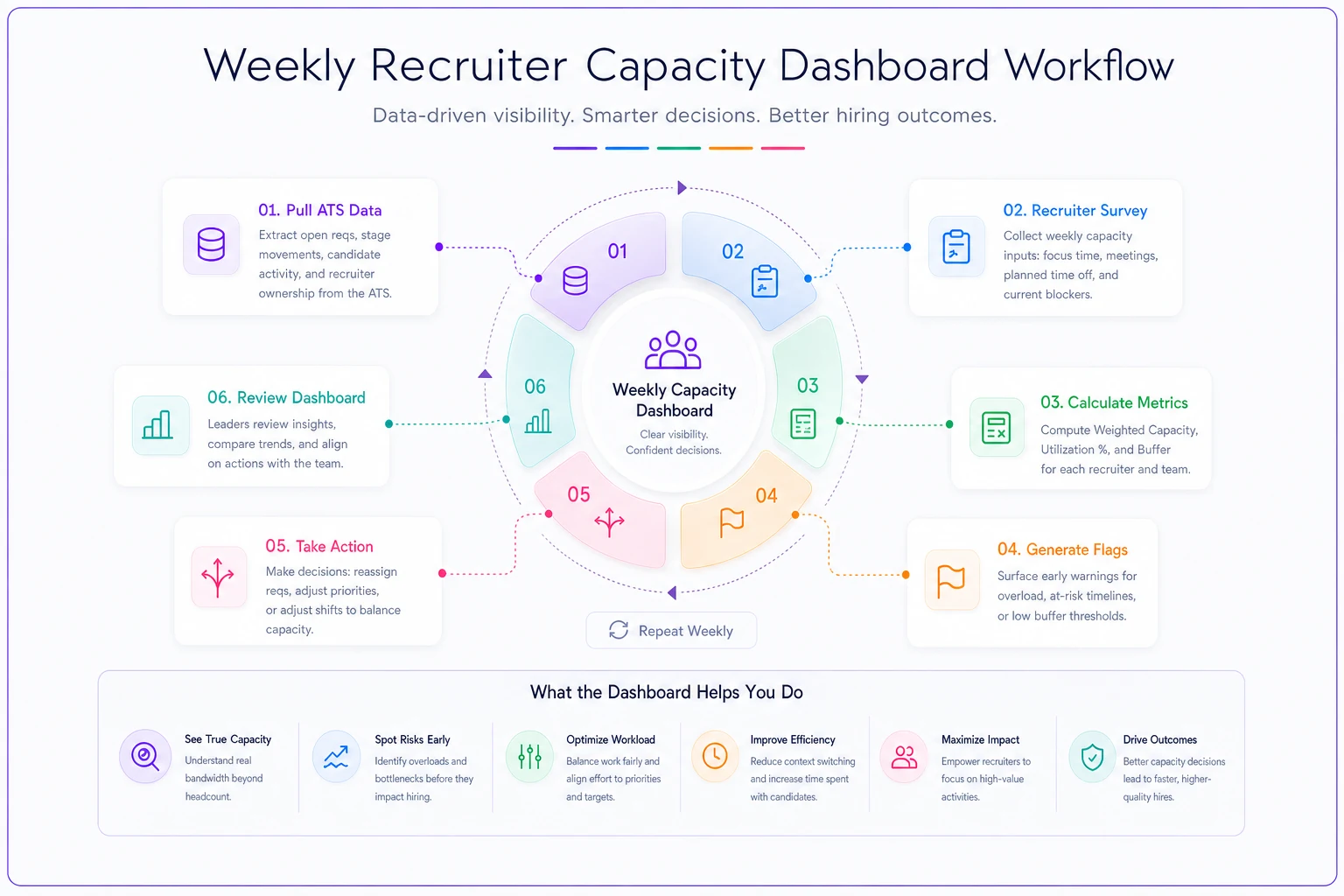
This illustrates how ATS data, the weekly survey, and calculated metrics feed a simple weekly capacity dashboard and trigger early-warning flags.
A recruiting manager running this simple system caught an upcoming capacity crisis three weeks early. Two recruiters had overlapping vacation the same week as a major hiring initiative launch. The dashboard showed yellow flags on capacity even though the hard metrics looked fine. A quick dig revealed the issue, leaving enough time to adjust coverage and delay non-critical reqs before anything broke.
When manual capacity planning hits its limits
This manual approach holds up well for teams of around 15–20 recruiters. Beyond that, maintaining spreadsheets and chasing weekly updates starts becoming a job in itself. You've hit the limit when:
-
Weekly dashboard updates take more than an hour
-
Data conflicts between different tracking sheets
-
Recruiters complain about duplicate reporting
-
Capacity meetings devolve into debates about data accuracy
-
Historical trending becomes impossible to maintain
At that point, proper capacity planning tools are worth the investment. But even with more sophisticated software, the core framework stays the same — role family segmentation, shift planning, buffer management, early warning tracking.
Several teams have automated their capacity tracking by connecting ATS data with simple workflow automation. Instead of manual weekly surveys, the system calculates capacity based on actual activity — screening calls logged, emails sent, pipeline stage movements. Less reporting burden, more accurate data. The automated approach also enables some predictive planning: by analyzing historical patterns, the system can flag upcoming capacity crunches based on current pipeline velocity and pending req approvals. One team avoided four potential capacity crises in about six months just by getting two weeks of advance warning on overload situations.
Making capacity planning stick without adding overhead
The biggest failure point for capacity planning isn't the model or the metrics — it's adoption. Recruiters already juggling dozens of reqs don't want another reporting requirement. The system has to provide immediate value to recruiters, not just give management a new dashboard to look at.
Frame capacity planning as workload protection, not performance monitoring. When recruiters see that accurate capacity data leads to better work distribution and fewer fire drills, they'll actually maintain it.
The weekly dashboard review should take 15 minutes max. Keep it focused on three questions:
-
Who needs help right now?
-
Who has bandwidth for new reqs?
-
What bottlenecks can we clear this week?
Don't turn it into a debrief on why someone's capacity is lower. Some weeks are harder. Some roles take more effort than expected. Trust your team's read on their own workload while using the data to spot patterns over time.
Teams that make this work tend to fold capacity planning into existing workflows rather than creating new meetings around it. Review capacity during your regular standup. Include capacity tracking in your recruiter onboarding process so new hires understand the system from day one. Make capacity visibility part of how the team operates, not a separate initiative that slowly fades.
The downstream impact of proper capacity management
When capacity planning actually works, the whole recruiting operation runs differently. Reqs move steadily through the pipeline instead of stalling unpredictably. Candidates get consistent communication instead of radio silence. Hiring managers see predictable progress instead of surprise delays.
The biggest impact though is on the recruiting team itself. Instead of constantly firefighting, recruiters have room for proactive work — building talent pools, improving processes, developing better sourcing strategies. Quality improves when people aren't just trying to keep up.
One recruiting team that implemented this framework saw their time-to-fill drop by about 18 days on average. Not because they worked faster, but because they eliminated the idle time when reqs sat waiting for an overloaded recruiter to get to them. Proper capacity planning meant every req had an appropriately loaded owner from the start.
The data also helps justify headcount decisions. Instead of guessing when to add a recruiter, you have clear utilization metrics showing when the team is consistently running above sustainable capacity — and which role families or shifts need more coverage specifically.
Recruiter capacity forecasting can sound like operational overhead. In practice, it's really about building a hiring engine that doesn't collapse when things get busy. When recruiters know their realistic capacity, when buffers prevent the scramble, and when early warning signals give you time to actually respond, the whole function operates at a higher level. Pipelines stay healthy, the team stays engaged, and the business gets the talent it needs without burning out the people finding it.
Ready to elevate your hiring process?
Join 1,500+ recruiting teams using Recioly to save time, improve collaboration, and hire smarter.